How to Stop Using Your Phone While Studying in Singapore: Evidence and a Desk Routine
To stop using your phone while studying, switch it off or leave it in another room for every revision block, and give the desk one task on one screen. Studies on a phone's mere presence are mixed, and in one 2013 simulated-lecture study, students who multitasked on a laptop scored lower on the test that followed. In Singapore, secondary schools have kept smartphones out of use during school hours since January 2026, allowing use by exception where necessary, and the PLD's default sleep hours now start at 10.30pm.
Why is it so hard to stop checking your phone while studying?
The phone competes with a study task on more than one front. Research links a nearby phone to a cost on working memory and laptop multitasking to lower test scores, and MOE links heavy screen use to lost sleep, so the pull reaches the study block and the rest around it.
Working memory carries the firmest result, and it is the mental workbench where a learner keeps the steps of an algebra problem or the clauses of an argument in play while a revision block runs. A 2023 review by Parry, a systematic review with six meta-analyses covering 7,093 participants, found that working memory was the one function where a nearby phone showed a significant negative effect. The other functions it pooled, such as attention and inhibition, showed no significant effect.
Multitasking was measured in a separate experiment. In a 2013 study by Sana, Weston and Cepeda, students who multitasked on a laptop during a simulated lecture scored lower on the test that followed, and so did participants who sat in direct view of a multitasking peer.
MOE names the wider cost of screens directly: hours on a device push out sleep, physical activity and time with other people, and MOE ties screen use to lower well-being. So the phone competes with study time and also with the rest that makes study time count. The fix starts with where the phone sits, which the next two sections take apart.
Does a phone on the desk hurt studying even when you never check it?
Possibly, and the evidence is genuinely mixed. Experiments from 2017 found a cost, a direct replication in 2022 found none, and two meta-analyses in 2023 split between a narrow effect on working memory and a broader negative effect.
The idea comes from Ward, Duke, Gneezy and Bos (2017). Their two experiments found that the mere presence of a person's own smartphone reduced the cognitive capacity available to them, even when they never checked it. The researchers called it the brain drain effect, and the cost was largest for the participants who depended most on their phones.
In 2022 Ruiz Pardo and Minda ran a pre-registered direct replication of the second experiment. They placed the phone on the desk, in a pocket or bag, or outside the room, each with the phone switched on or off: six conditions in all. The effect did not replicate, and the phone's location made no difference to performance.
Two meta-analyses followed in 2023. Parry's review, six meta-analyses covering 7,093 participants, found a significant negative effect on working memory capacity alone, and it flagged substantial differences in method between studies and generally poor statistical power. Böttger, Poschik and Zierer pooled 43 effects from 22 studies on memory, attention and general cognitive performance, and they found a significant overall negative effect of smartphone use and presence taken together, with some domains affected more than others.
What does that mean at a study desk? The fair reading is that a visible phone may cost some working memory, Ward's team found the cost highest for the participants most dependent on their phones, and moving the phone costs nothing at all. When the evidence is uncertain and the remedy is free, moving the phone is the sensible bet.
Should your phone be on silent, switched off or in another room when you study?
Switched off or in another room is the safer choice on the evidence available. One 2019 study compared silent with off: learners high in positive urgency showed more interference from a silent phone in view. Another room adds a practical guard, since a phone out of reach cannot be checked mid-block.
Canale and colleagues (2019) tested 132 students aged 18 to 25 on a visual working memory task in three set-ups: phone switched off and visible, phone on silent and visible, or phone replaced by a calculator. Learners who scored higher in positive urgency, the tendency to act on impulse when excited, showed more interference with the phone on silent than with it switched off. The study had no other-room condition.
The table below summarises what each study tested. No single study compared all four places a phone usually ends up during homework, so the rows form no ranking.
The last row rests on a practical point outside the experiments: a phone in another room cannot be picked up mid-block. The 2022 replication found no score difference between locations, so this step guards access, and that distance does the work willpower is asked to do.
| Phone state | What studies found | How sure the evidence is |
|---|---|---|
| On the desk and switched on | Ward and colleagues (2017) found reduced cognitive capacity; the 2022 replication found no effect; Böttger and colleagues (2023) found an overall negative effect of smartphone use and presence pooled together | Mixed: one replication against, one meta-analysis of use and presence in favour |
| On silent and visible | Canale and colleagues (2019) found more interference for impulsive learners than with the phone switched off | Low to moderate: one study of 132 students aged 18 to 25 |
| Switched off and visible | Less interference than silent for learners high in positive urgency in the 2019 study; Parry (2023) found presence effects on working memory only | Low to moderate for the silent comparison, from one study; mixed for presence itself |
| Out of the room | No difference between locations, outside the room included, in the 2022 replication; a phone out of the room cannot be checked during the block | One replication on the mental cost; the access point is practical and untested |
Does multitasking on a laptop during a lecture lower test scores?
In one 2013 study, yes. Students who multitasked on a laptop during a simulated lecture scored lower on the test afterwards, and so did participants who sat in direct view of a multitasking peer.
Sana, Weston and Cepeda (2013) ran the study as a simulated lecture. Participants who multitasked on a laptop scored lower when tested on the lecture content, and participants in direct view of a multitasking peer also scored lower, though they had done no multitasking themselves. It is one study in one setting, with laptops, so it reads as a moderate signal.
For a Singapore learner, the study's setting is closest to a lesson where a laptop or PLD sits open in view of others. Homework with a chat window beside a worksheet was never tested, yet it has the same shape: two tasks sharing one screen. Keeping one task on one screen costs nothing and follows the direction of the study.
The remedy is easy to state: one task on one screen at a time. The worked example further down shows what that looks like on a school device, where the screen is part of the homework.
What are the phone rules in Singapore secondary schools from 2026?
Since January 2026, MOE's guidelines keep a secondary student's smartphone and smartwatch out of use during school hours, and school hours now include recess, CCA and supplementary, enrichment or remedial lessons. The phone sits in a locker or other storage the school designates, or inside the school bag, and a school may allow use by exception where necessary.
MOE announced the tightened guidelines on 30 November 2025 and set out the details in a parliamentary reply on 13 January 2026. The rule covers smartphones and smartwatches; the Personal Learning Device is a separate school device with rules of its own, covered in the next section.
The 2026 guidelines are written for secondary schools. A JC student, a polytechnic student or an adult learner builds the same habit at home, using the routine further down this guide.
- Before 2026: smartphones and smartwatches were kept out of use during lesson time.
- From January 2026: recess, CCA hours, and supplementary, enrichment or remedial classes now fall inside the school hours the rule covers.
- Where the phone goes: a locker or other storage the school designates, or the learner's school bag, and the smartwatch follows the same rule.
- Exceptions: a school may allow use by exception where it is necessary.
- Smartwatches: included because they allow messaging and app access, social media among them.
- Emergencies: parents reach a learner through the school's General Office, and learners call home from it.
- Discipline: each school's own discipline policy continues to apply alongside the guidelines.
What is the PLD and what does its management app do?
The Personal Learning Device is a PLD selected by the school for learning, and MOE's December 2020 plan said secondary students would own one by the end of 2021. Its Device Management Application filters objectionable content, reduces learning distractions at school and disables the device during sleep hours.
MOE's plan rolled the PLD out in two phases: 86 schools were to receive devices by Term 2 of 2021 and 66 more by Term 3, with students graduating in 2021 left out. The device supports Blended Learning, which schedules home-based learning days regularly through the year, and the Singapore Student Learning Space is one of the technologies supporting it.
The management app also shapes the after-school picture. Parents can monitor and safeguard the MOE-issued device and set boundaries on screen time, and how many restrictions apply after school depends on the option they chose.
So the PLD and the phone sit on two sides of one line. The PLD is the device a learner is expected to study on, with guard rails built in; the phone is the device the 2026 rules keep out of the school day. A good home routine keeps that same line.
- Ownership: MOE's 2020 plan said secondary students would own a PLD by end-2021, with that year's graduating students not included.
- Purpose stated by MOE: protection from objectionable content and fewer learning distractions at school.
- Sleep hours: the device is disabled during sleep hours, which by default start at 10.30pm from January 2026, earlier than the previous 11pm.
- After-school settings: where parents opted for fewer restrictions, MOE strongly encourages them to set the sleep hour to 10.30pm as well.
How do you use the PLD or a laptop for homework without drifting?
Give the device one job per session: one tab, one task and a written stop point. When the device is the tool, the session plan has to say exactly what the tool is for.
Lower secondary learners have opportunities to use spreadsheets, word processing and presentations inside subject tasks on the PLD, and home-based learning days are supported by the Student Learning Space and run less structured than a typical day in school. That makes "put the device away" hard advice whenever a task sits on the PLD. The answer is to narrow what the device does.
The worked example below follows one such session from the first line on paper to the stop point.
The paper does the heavy lifting here. A written stop point gives the session a finish line, and a written list of questions to send later turns each urge to open the group chat into a note that waits its turn. It follows the direction of the 2013 multitasking study: one task on one screen.
Worked example
One Student Learning Space assignment, one screen
A Secondary 2 learner has a geography assignment on the Student Learning Space: read a resource, build a short spreadsheet comparing monthly rainfall in two cities, then write three sentences on the pattern. How does the session run so the PLD stays a tool?
- Before opening the device, write the task and the stop point on paper: spreadsheet done and three sentences written.
- Switch the phone off and leave it in another room, so the PLD is the only screen in reach.
- Open the Student Learning Space and the spreadsheet only, and close every other tab, chat included.
- Work in one block of about 40 minutes, then stand and move for 3 to 5 minutes.
- When a question needs a classmate, write it on the paper and send it at the end.
- At the stop point, check the work against the task line, then open messages.
One written task, one stop point, the phone off in another room and two windows open on the PLD: the assignment ends at the stop point, and messages wait until then.
What is a simple routine for a phone-free study block?
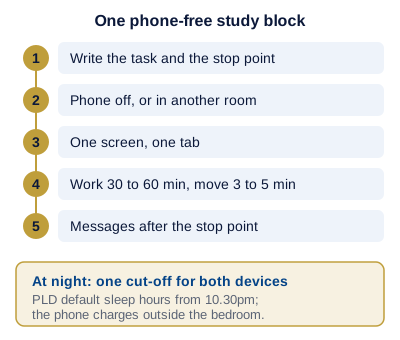
Decide the task, put the phone out of the room or switch it off, open only what the task needs, work for 30 to 60 minutes with a short movement break, and check messages only at the end.
Three of the five steps follow the research directly: the phone placement, the single screen and the movement break. The first and last steps are practical habits that hold the block together.
Start with a short block if 30 minutes feels long. Four honest blocks of 30 minutes add up to two hours of real work, and a block can grow once 30 minutes regularly ends without a reach for the phone.
A group chat that carries class announcements is the usual sticking point. Agree a reply window with classmates, such as after dinner, and keep the chat for that window. A learner who needs to stay reachable by family can leave the phone in another room with calls allowed through, so a ring still gets through while notifications wait.
- Decide the task first. Write one line, such as "Chemistry: ten mole calculations from the worksheet". A written task gives the block a clear finish line.
- Phone out of the room, or switched off. A switched-off phone caused less interference than a silent one for learners high in positive urgency in the 2019 study, and distance removes the check entirely. The 2022 replication found no location effect on the test itself, so treat this step as a guard on access.
- One screen, one tab. When the task needs a device, open the PLD or laptop to the single page the task requires.
- A block of 30 to 60 minutes, then 3 to 5 minutes of movement. Long stretches at the desk are what the Singapore 24-hour guideline wants interrupted, so a timer that calls a stand-up break also hands the urge to scroll a fixed slot.
- Messages at the end. Read and reply after the stop point, then decide whether a second block follows.
How much recreational screen time do Singapore guidelines advise?
For anyone aged 7 to 18, the Singapore 24-hour guideline links the poorest health results to recreational screens used for 2 hours a day or longer, and it advises keeping that off-task screen time to a minimum. MOH sets firmer limits for younger children.
MOH, MOE and MSF launched Grow Well SG on 21 January 2025. It focuses on children up to 12 for a start and is set to extend to older ages later. Its screen guidance sits on an MOH page dated 21 January 2025 and first published in 2023, and it covers screen use outside school.
For teenagers, the 24-hour guideline is the Singapore reference to use, because the MOH documents read for this guide set hour limits for children up to 12. The MOH line for ages 7 to 12 treats schoolwork separately from leisure, and older learners can borrow that split: count leisure screen time on its own clock and keep PLD homework out of it.
| Age band | Guidance | Source |
|---|---|---|
| 3 to 6 | Less than 1 hour a day of screen use outside school | MOH, Grow Well SG (2025) |
| 7 to 12 | Less than 2 hours a day outside school unless the use is schoolwork; no unrestricted access to mobile devices and no social media | MOH, Grow Well SG (2025) |
| 7 to 18 | Recreational screens at 2 hours daily or longer are associated with the most negative health effects; limit that time as much as possible | Academy of Medicine Singapore, integrated 24-hour guidelines for ages 7 to 18 (2021) |
How do you tighten phone use in exam season and at night?
Move the phone's bedtime earlier, keep it out of the bedroom and give revision days fixed message windows. The PLD already sleeps from 10.30pm by default, so matching the phone to that hour gives one shared cut-off.
Exam season raises the stakes on everything MOE lists about screen use: it displaces sleep, physical activity and time with people, and a heavy revision week leans on all three. Late-night scrolling takes its time straight out of that sleep.
In January 2026 the school device's default sleep hours moved to 10.30pm, earlier than the former 11pm, and MOE strongly encourages parents who opted for fewer after-school restrictions to set the same 10.30pm hour. A learner can copy that rule to the phone: when the PLD sleeps, the phone goes to charge outside the bedroom. One cut-off for both devices is easier to keep than two.
On revision days, set two or three message windows, for example at lunch, after the afternoon block and after dinner, and keep the phone switched off between them. Leisure screen time can wait until the last paper. The 24-hour guideline advises limiting recreational screen time as much as possible, and it links 2 hours a day or more to the most negative health effects.
How sleep itself shapes memory and revision is the subject of our guide to sleep before exams.
Worked example
Setting one night-time cut-off for two devices
A Secondary 3 learner revising for end-of-year exams has a PLD on default settings and a personal phone with no cut-off. How does the learner set one bedtime for both?
- Read the PLD's default: from January 2026, sleep hours start at 10.30pm.
- If the household opted for fewer after-school restrictions, note that MOE strongly encourages setting the PLD's sleep hour to 10.30pm as well.
- Set the phone's own cut-off to the same 10.30pm and choose a charging spot outside the bedroom.
- On revision days, fix two or three message windows, such as lunch, after the afternoon block and after dinner, with the phone switched off between them.
Both devices stop at 10.30pm, the phone charges outside the bedroom, and messages on revision days live inside the chosen windows.
Do app blockers and focus modes help you study?
Their effect on studying has no direct research behind it in the studies read for this guide, so treat blockers, focus modes and timers as practical aids that add friction, and pair them with the phone out of reach.
A focus mode on a phone or laptop silences notifications and can hide chosen apps for a set time, and a site blocker on a laptop closes the pages that pull a learner off task. Both make the check harder, and that friction is the point. With a focus mode on, the phone usually stays in view and the setting is quick to switch off, so distance stays the first step.
Use them where distance is impossible. On the PLD, the management app filters content and reduces distractions at school and disables the device during sleep hours; after school, how much it restricts depends on the option the parents chose. On a personal laptop, a site blocker set for the length of one study block is a simple aid. Keep the setup simple: one rule, set once, before the block begins.
What happened to exam results in schools that banned phones?
In a study of schools in four English cities, exam results rose after the schools banned phones, and the gains were driven by the lowest-achieving students.
Beland and Murphy (2016) compared each school's results before and after its ban, against schools that changed nothing at the same time, a design called difference-in-differences. It is observational evidence: it shows what followed the bans in those schools and leaves the exact cause open.
The shape of the gains is the striking part: the students who gained most were the lowest achievers. The study measured school-wide bans against exam results, and home study blocks sat outside it, so its finding speaks about schools and the school day.
Singapore's 2026 rule for secondary schools covers the school day. The home study hours remain the learner's to shape, and the routine in this guide rests on the presence and multitasking studies covered above.
Which phone habits quietly cost study time?
Four habits do most of the damage: a silent phone left in view, a quick check between questions, a group chat open during homework and a device in bed.
Each habit is small, and each can repeat many times in a week. Fix one at a time, starting with the one that happens most often.
- Silent but visible. Silencing the phone feels like enough, yet in the 2019 study, learners high in positive urgency showed more interference from a silent phone in view than from one switched off. Switch it off or move it.
- The quick check between questions. Each check turns one task into two. Use the gap after a finished question to read the next one.
- Group chat open during homework. A chat beside a worksheet puts two tasks on one screen, close to the laptop multitasking that went with lower test scores in the 2013 simulated-lecture study. Batch replies at the stop point.
- Device in bed. The PLD sleeps from 10.30pm by default, and a phone in bed keeps the night open. Charge it outside the bedroom.
Can one-to-one tuition anchor your phone-free study habit, and what are the steps to sign up?
A one-to-one lesson is a focused hour of study with a second person in it, and the habit carries over: a clear task, a stop point, and tutor notes after every session.
Each of our tutors brings experience and skill in the subject being taught, and the hour goes to the work itself: the SEC papers that Sec 4 and Sec 5 learners sit from 2027, the chemistry calculations, the essay plan. The phone routine rides along with that work. The tutor writes notes after every session.
Home lessons happen at the learner's own desk at home, with the tutor matched to the learner's town and timetable. Online lessons run on the learner's own device.
Learners at every stage register the same way: a Secondary 3 student, a JC student, a polytechnic student or an adult returning to study. Whoever fills in the form, the lessons are planned around the learner.
- Use Register Now to sign up for tuition, or Ask a question to send a query first. Whichever form a learner sends, the first consultation is a conversation with our team and costs nothing.
- Our team picks the tutor for the subject, level and timetable, drawing on more than 12,000 tutors.
- Pick home lessons, with the tutor matched to the learner's town and timetable, or online lessons on the learner's own device.
- Start with Starter: a package of four 60-minute lessons, with a lesson moved or cancelled free on 24 hours' notice.
How much does tuition cost?
Each tuition page shows its current rates by level and format in its own price table, and our tuition rates guide compares them. The table reads from our pricing engine, so it shows the live rate.
Starter is the entry package: four 60-minute lessons, which means four phone-free blocks with a tutor, settled in one payment or as 50% at the start and 50% at the midpoint. First-time learners also meet a one-time registration fee, which appears in that same engine table. Home and online lessons are priced in their own rows, so a learner can compare the two formats side by side before registering. Why a lesson's rate moves with level and subject is explained in our tuition rates guide for Singapore.
How can you see that the routine is working?
Two records show it: the monthly progress report and tutor notes after every session. Together they show whether the subject work moves forward.
A simple self-check sits beside them: count the study blocks each week that ended without a reach for the phone, and watch that number climb.
- Monthly progress report: a regular view of progress in the subject.
- Tutor notes after every session.
- Free tutor replacement: our team arranges another tutor whenever the learner asks.
- Matching by our team: each tutor is chosen for the subject, level and timetable.
Where should you read next?
Night-time phone use and what it does to memory belong to our guide to sleep before exams. A Primary 6 leaver who will soon receive a PLD selected by their secondary school can read our notes on how to prepare for Secondary 1. Learners keen to use their phone and PLD with greater skill have a digital literacy course in Singapore waiting for them.
One-to-one lessons for secondary learners sit on our pages for secondary school tuition in Singapore and N-Level tuition in Singapore. What a block of lessons costs at each level is set out in our Singapore tuition rates guide.
Sources
- MOE, 29 December 2020
- MOE, 30 November 2025
- MOE EdTalks, 28 Mar 2025: MOE's views on digital devices and purposeful and healthy screen use
- MOE parliamentary reply, 13 Jan 2026: Smartphone Ban in Secondary Schools from 2026
- MOH: Grow Well SG
- MOH: Guidance on screen use in children (21 Jan 2025)
- 24-Hour Activity Guidelines (2021)
- Ward, Duke, Gneezy and Bos (2017), Brain Drain, Journal of the Association for Consumer Research
- Ruiz Pardo and Minda (2022), Reexamining the brain drain effect, Acta Psychologica
- Parry (2023), A Meta-Analysis of the Brain Drain Effect, Media Psychology
- Böttger, Poschik and Zierer (2023), Does the Brain Drain Effect Really Exist? A Meta-Analysis, Behavioral Sciences
- Beland and Murphy (2016), Ill Communication: Technology, distraction and student performance, Labour Economics
- Sana, Weston and Cepeda (2013), Laptop multitasking hinders classroom learning, Computers and Education
- Canale and colleagues (2019), Scientific Reports 9 18519
- MOE: Full SBB FAQ
One-to-one lessons with Eduprime
At home in Singapore or online. The first consultation is free, and a tutor can be changed whenever the learner asks.