Eduprime Singapore
Coding and Robotics Classes Singapore From Scratch to H2 Computing
Coding and robotics classes in Singapore from Eduprime give each learner a private tutor for Scratch, Python, robotics, AI tools, web design or data skills, taught at the learner's own desk at home or over a shared online screen. A pre-schooler sequencing a first robot and a manager learning SQL each get a tutor from our 12,000+, matched to goal and timetable. Fees sit in the table below.
4.8 average from 1,713 reviews across these programmes
What a lesson costs
Fees
What a lesson costs
Every programme is priced per 60-minute session in three formats. These are the lowest figures among the programmes on this page; each programme page shows its own.
- Widest availability
Online International Tutor
fromS$19/ session
60-minute session
The widest bench of tutors across time zones, so a slot is open at almost any hour. Lessons run online over a shared screen.
Online Local Tutor
fromS$32.30/ session
60-minute session
A tutor based here who knows our schools, syllabuses and exams, teaching online.
Home Tutor
fromS$38/ session
60-minute session
A local tutor who comes to the learner, at home or at a nearby study spot, matched to their town and timetable.
Minimum 4 sessions. Larger packages lower the per-session price. One-time S$15 registration fee for new learners.
Last updated
What are one-to-one coding and robotics classes and who are they for?
Each session in a one-to-one coding and robotics class is built around a single learner's project, pace and target, with the tutor's full attention on that one keyboard.
Lessons happen in two places. For a home lesson we look for a tutor near the learner's town who is free in the hours the learner can sit at the keyboard. Online, tutor and learner share one screen, and any desk with a steady connection becomes the classroom.
The learners on this page span a wide range. A five-year-old can start with robot sequencing, a Primary 5 learner can turn Scratch games into Python, a JC student can prepare for H2 Computing, and a retiree can learn to use a phone and a laptop with confidence.
The tutors on this hub bring hands-on experience and real skill in coding, robotics or computing, and because Eduprime offers 148+ programmes, a learner who outgrows Scratch games and turns to data analysis later keeps the same team. The sections below help each learner pick a starting tool, a goal and a format.
What should a learner start with, and at what stage?
A starting tool follows the learner's stage: physical robots and sequencing for pre-schoolers, Scratch blocks for primary learners, and Python or data tools from secondary school onward.
Scratch is the usual first step because it is free for everyone. The Scratch Foundation now maintains it, after it was created at the MIT Media Lab in 2007 and transferred from MIT in 2019.
A learner who already writes loops and conditions in blocks is ready for typed code. The jump feels smaller when the first Python program rebuilds a game the learner made in Scratch.
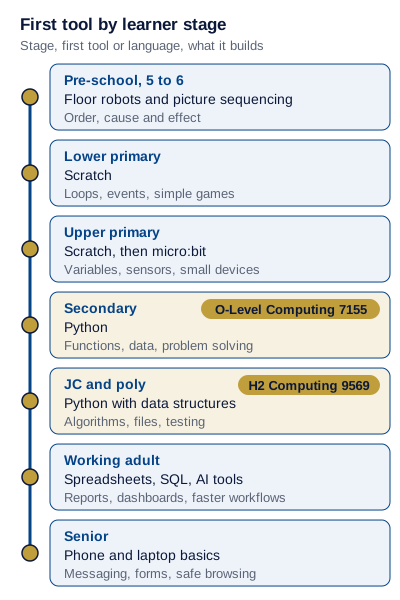
The ladder below runs from a pre-schooler's floor robots to a senior's phone and laptop, and marks O-Level Computing 7155 and H2 Computing 9569 on the stages that lead to them.
| Learner stage | First tool or language | What it builds | School link | Our page |
|---|---|---|---|---|
| Pre-school, 5 to 6 | Floor robots and picture sequencing | Order, cause and effect | NRC has a Preschool KUBO Challenge for ages 5 to 6 | robotics stem learning course singapore |
| Lower primary | Scratch | Loops, events, simple games | Scratch is free to use at home | coding for kids course singapore |
| Upper primary | Scratch, then micro:bit | Variables, sensors, small devices | Code for Fun or a similar programme is mandatory for upper primary | stem education course singapore |
| Secondary | Python | Functions, data, problem solving | O-Level Computing, subject code 7155 | programming tuition singapore |
| JC and poly | Python with data structures | Algorithms, files, testing | H2 Computing, subject code 9569 | programming tuition singapore |
| Working adult | Spreadsheets, SQL, AI tools | Reports, dashboards, faster workflows | Workplace goals set the syllabus | data science analytics basics singapore |
| Senior | Phone and laptop basics | Messaging, forms, safe browsing | Daily tasks set the syllabus | computer tuition singapore |
Which coding or robotics programme fits my goal?
A programme follows the goal the learner names at the first consultation, and each goal points to one topic page with its own first four sessions.
Goals are concrete here. Preparing for a Computing paper asks for a different first month from building a competition robot, filling a portfolio, launching a website or automating a monthly report. The table therefore lists what the opening four lessons of the Starter package produce, and the piece of work the learner walks away with.
Two goals often overlap. A secondary learner aiming at a robotics entry and a school Computing subject can start with Python and add the robot build in the second package.
| Goal | Programme page | First 4 sessions build | Visible output |
|---|---|---|---|
| School Computing subject | programming tuition singapore | Python fluency on past topic areas | A folder of solved problems with tutor notes |
| Robotics competition | robotics stem learning course singapore | Build, sensors, a scored run | A working robot routine on video |
| Portfolio for DSA or poly | dsa preparation tuition singapore | One project with a written log | A project page the learner can present |
| Website or app product | web development tuition singapore | HTML, CSS, a first interactive page | A working page the learner can share |
| Data and AI at work | data science analytics basics singapore | SQL queries and one dashboard | A dashboard built on the learner's own data |
| Office productivity | microsoft office course singapore | Formulas, tables, clean templates | A reusable workbook for a real task |
| Staying safe online | digital literacy course singapore | Scam signs, passwords, privacy settings | A personal safety checklist in use |
What does school already teach about coding and AI in Singapore?
Singapore schools give every upper primary student a first taste of coding through Code for Fun or a comparable school coding programme, and many schools now add short AI modules.
The school programmes are short by design. Code for Fun offers 10 hours to a school, and the AI for Fun electives run five to 10 hours of hands-on prototyping, so a learner meets the ideas once and moves on.
One-to-one lessons pick up where those hours end. The tutor takes the project a learner liked in school, finishes it, then builds the next one at a pace that suits the learner, with notes after every session.
IMDA lists both tracks, Code for Fun and AI for Fun, for primary and secondary schools. A learner who enjoyed either one at school can bring the school project to the first consultation, and the tutor reads it to set the starting point.
- Code for Fun, or a comparable coding programme, has been mandatory for all upper primary students since 2020, according to the Ministry of Digital Development and Information.
- AI for Fun modules started in 2025 and were made available to all primary and secondary schools; by 2026 more than half of those schools had joined, MOE reported.
- An updated Code for Fun programme reaches all schools from 2027, as the Minister for Education announced in July 2026.
- The Digital Maker Programme, launched in 2017 by IMDA with MOE, put the micro:bit into 220 schools (61% of primary and secondary schools) and reached at least 105,000 students by April 2019.
How does Computing work as an O-Level or A-Level subject?
Computing is a national examination subject at both levels: O-Level Computing carries subject code 7155, and A-Level Computing is offered at H2 only, as 9569.
SEAB lists both codes for 2026 school candidates. There is no H1 Computing, so a JC student who wants the subject takes the full H2 load.
H2 Computing splits the grade between a written paper and a practical one. Both papers make every question compulsory, so a learner needs steady coverage across the syllabus with no topic left to chance.
The lab-based paper is where one-to-one lessons pay off most. Three hours of coding at a machine rewards speed in reading a task, writing clean Python, testing it and fixing errors calmly, and those habits come from timed practice with a tutor watching the process.
O-Level Computing sits on the SEAB list for 2026 school candidates as subject 7155. A secondary learner who chose the subject gets the most from lessons that mix concept questions with regular coding at the keyboard.
For past-year Computing practice and topic lists at each level, our programming tuition page goes deeper, and the O-Level and A-Level guides place 7155 and 9569 within the national exams.
| Paper | Mode | Duration | Weight |
|---|---|---|---|
| Paper 1 | Written | 3 hours | 60% |
| Paper 2 | Lab-based practical | 3 hours | 40% |
Worked example
How the two H2 Computing papers combine
Mei scores 70% on Paper 1, the written paper, and 55% on Paper 2, the lab-based practical. Paper 1 carries 60% of the H2 Computing grade and Paper 2 carries 40%. What share of the total does she reach, and what is a point on each paper worth?
- Paper 1 counts for 60% of the total, so 70% on it gives 0.6 x 70 = 42 points.
- Paper 2 counts for 40% of the total, so 55% on it gives 0.4 x 55 = 22 points.
- Add the two parts: 42 + 22 = 64 points out of 100.
- Each extra mark on Paper 1 adds 0.6 to the total and each extra mark on Paper 2 adds 0.4, so 10 more percentage points in the lab paper lift Mei to 68.
Mei reaches 64% of the combined H2 Computing marks, and 10 more percentage points on the lab-based paper would take her to 68%.
Which coding and robotics competitions and portfolios open doors?
Singapore's main paths are the National Robotics Competition, the Singapore NOI, the National Youth Tech Championship and the DSA-Sec talent area for science, mathematics and engineering.
Each path rewards a different kind of work. Judges, organisers and schools decide every result and every place, and lessons build what they look at: the robot run, the solved problems, the project and the log behind it.
Our robotics page covers NRC builds, and the DSA preparation page covers the portfolio and interview.
| Path | Who it suits | Age or level | When | What to prepare |
|---|---|---|---|---|
| National Robotics Competition, Science Centre Singapore, since 1999 | Builders who like sensors and scored runs | Regular: lower primary 7 to 9, upper primary 10 to 12, secondary 13 to 17, tertiary 17 to 20. OPEN: primary 7 to 12, secondary 12 to 17, tertiary 16 to 19. AI Maker Series: primary 7 to 12, secondary 12 to 17. Preschool KUBO: 5 to 6 | August in 2026 | A category choice: Regular, OPEN, AI Maker Series or Preschool |
| Singapore NOI | Strong problem solvers | See the organiser's notice | See the organiser's notice | Algorithm practice; Gold or Silver gives the option of a CS1010 exemption at NUS Computing |
| International Olympiad in Informatics | Top olympiad coders | See the organiser's notice | See the organiser's notice | Gold, Silver or Bronze brings exemption from CS1010 and CS2040 at NUS Computing |
| National Youth Tech Championship | Young people building with AI | Youth categories set by organisers | See the organiser's notice | An AI project; run by IMDA, SIT and Google since 2023 |
| DSA-Sec, science, mathematics and engineering | P6 students with a tech track record | Primary 6 | May to early June in 2026 | A portfolio of projects and a clear account of each |
Should a learner still learn to code now that AI writes code?
Yes. MOE frames AI in school as four kinds of learning, and in our view a learner who understands code gets more out of each of them, from learning about AI to learning beyond it.
A learner who can read code can check what an AI tool produced, spot the bug and explain the fix. In school, the AI for Fun modules introduce AI through hands-on tinkering, such as building prototypes with AI and training robots to respond to signals.
Schools moved quickly on this. More than half of primary and secondary schools had joined AI for Fun by 2026, so many learners now meet AI tools in class and need a calm place to practise the thinking behind them.
Our ChatGPT training page teaches AI tools as a skill of its own, and coding lessons add those tools once the basics hold, with the learner writing the core logic first. The four learns, as the Minister for Education set them out in 2026:
- Learning about AI: what a model is and where its answers come from.
- Learning how to use AI: prompts, checking output and knowing when to stop.
- Learning with AI under guardrails: AI as a study partner inside clear rules.
- Learning beyond AI: the judgement, creativity and care that stay with people.
What about web design, UI/UX and animation classes?
Design and animation sit beside coding on this hub, for learners who want to make things people see and use.
Web design starts with HTML, CSS and layout in Figma, and our web design page covers it. Web development adds JavaScript and frameworks such as React for learners who want a working product, on its own page.
UI/UX lessons teach research, wireframes and usability testing, which suits a poly student building a portfolio or an adult moving into a product role. Younger learners who love drawing can start with animation for kids, where characters, frames and timing come before any code.
A learner can move between these pages over time. A Scratch animator often grows into a web designer, and a designer who learns some code builds prototypes that feel real.
What can a working adult or a senior learn one to one?
Adults and seniors learn the same way as younger learners on this hub: one tutor, one goal, and lessons built on the tasks the learner faces this month.
Adult learners bring real material. A finance executive can bring last month's spreadsheet, a shop owner a website that gets no visitors, and a retiree the banking app that keeps asking for a code.
Every item in this list links to a programme with its own syllabus, and the first consultation settles which item a learner tackles first.
Seniors often prefer home lessons, with the tutor beside them at their own phone and laptop. Working adults often take online sessions after office hours, sharing the screen they use at work.
- Data and SQL: queries, cleaning and a first dashboard, on the data science analytics basics page.
- Cybersecurity basics: how attacks work and how to defend a home or small office network, on the ethical hacking page.
- Digital marketing: SEO, analytics and content planning for a business or a career switch.
- Excel and Office: formulas, pivot tables and clean documents, on the Microsoft Office course page.
- AI tools at work: prompting, checking output and building repeatable workflows, on the ChatGPT training page.
- Computer basics and scam safety: email, video calls, government forms and the warning signs of a scam, on the computer tuition and digital literacy pages.
One-to-one, group class or holiday camp: which coding format suits a learner?
A one-to-one format suits a learner with a named goal, while group classes and holiday camps suit a learner exploring with peers on a fixed plan.
The table compares the four common formats on the points learners ask about most. Eduprime teaches the first two.
| Point | One-to-one at home | One-to-one online | Group class | Holiday camp |
|---|---|---|---|---|
| Pace | Set by the learner | Set by the learner | Set by the class | Set by the camp plan |
| Tutor attention | Full session | Full session | Shared | Shared |
| Project choice | The learner's own | The learner's own | Class project | Camp project |
| Schedule | Agreed with the tutor | Agreed with the tutor | Fixed weekly slot | School holidays |
| Equipment | The learner's own kit at home | Laptop or tablet the learner already uses, shared on screen | Often provided on site | Often provided on site |
| Progress record | Notes every session, monthly report | Notes every session, monthly report | Varies by provider | Usually an end-of-camp showcase |
| Cost logic | Per package of sessions | Per package of sessions | Per term | Per camp |
What does a learner need at home or online for coding lessons?
A learner needs a working computer or tablet, the free tools the tutor names, any robotics kit or micro:bit they own, and a quiet desk.
Equipment stays the learner's own, and we supply the lesson plans, worksheets and starter project files. Online lessons use screen sharing, which suits coding, design and data work well.
- A laptop or desktop that runs a current browser; a tablet works for Scratch and early design.
- Free tools first, such as Scratch, which is free for everyone.
- For robotics, the learner's own kit or micro:bit at home; online robotics lessons need it on the desk.
- A headset and a stable connection for online lessons.
- A quiet desk where the screen can be shared.
What does a 4-session Starter package of coding look like?
A Starter package is four 60-minute sessions with one clear output at the end, and this example follows a Primary 5 learner moving from Scratch to Python.
The learner has built three Scratch games after the school Code for Fun hours and wants to try typed code. The plan carries the same game across both tools, so every new word of Python maps to a block the learner already knows.
An adult version runs the same way. A sales coordinator brings a monthly export, learns SQL queries in sessions 1 and 2, cleans the data in session 3 and presents a first dashboard on her own figures in session 4.
- Session 1: rebuild the learner's Scratch catch game on paper as steps, then name each step as a Python idea. Tutor notes record which blocks the learner explains unprompted.
- Session 2: install a free Python editor on the learner's own computer, print, take input and use variables to keep score.
- Session 3: loops and if statements move a player and count catches; the learner fixes two planted bugs alone.
- Session 4: the learner finishes a text version of the game and explains each part aloud.
- After session 4: the output is a working Python game the learner can show, and the notes name the next step, such as adding a simple graphics library.
How is progress in coding and robotics lessons shown?
A coder's progress is recorded four ways: tutor notes after every session, a monthly progress report, a folder of finished projects, and the exam or competition milestones set at the start.
Code makes progress easy to see, because a program either runs or it does not. The records turn that into a clear story over months.
For a learner preparing H2 Computing or a robotics entry, the milestones line up with the exam or competition month, so each report shows how much ground is left.
- Tutor notes after every session: what was built, what the learner did alone and what comes next.
- Monthly progress report: skills gained across the month and the plan for the next one.
- Project folder: every game, robot routine, page or dashboard, kept in order so the learner can present it.
- Milestones: Computing paper topics covered, a competition entry date or a DSA portfolio draft, set at the start.
How much do coding and robotics classes cost in Singapore?
Coding and robotics class fees appear in the engine price table on this page, one row per lesson format, and the smallest package covers a learner's first four 60-minute lessons.
The price table on this page is drawn from our pricing engine, so the figure a learner sees there is the one used at registration. First-time coders also find their one-off registration fee printed in that same table, charged once per new learner.
Payment for a coding package comes either whole at the start or split down the middle, with half before the first lesson and half once the package reaches its midpoint. Devices, kits and software subscriptions stay with the learner, so the fee covers teaching, lesson plans, worksheets, starter files and the progress records.
A learner who starts with the Starter package can renew in the same format or switch between home and online as the goal changes, and the table shows each option.
What happens between pressing Register Now and a learner's first line of code?
The route to a first line of code opens with a free consultation with our team, booked on the registration form; we then pick a tutor whose strengths fit the coding goal and, for lessons at home, one who can reach the learner's town in the hours the learner is free.
Anyone can register a learner: the learner, a parent, a sibling or an employer. The steps stay the same.
- Register Now opens the registration form, where the learner writes down the coding goal: a game, H2 Computing or a work dashboard, for example.
- Our team holds the free first consultation to set the starting tool and the first four sessions.
- We choose the tutor from the coding goal first; for home lessons, the learner's town and free hours narrow the choice.
- The first package is the Starter: four 60-minute lessons that set up the learner's tools and first project, paid in full or in two halves, one at the start and one mid-package.
- Tutor notes arrive after every session and the progress report each month.
- For anything else first, the Ask a question button opens the contact form.
What can a learner check before and during coding lessons?
A learner can check the records, the tutor fit and the plan at every stage, and replace a tutor free of charge at any time.
Coding rewards a good tutor match, because explanation style matters as much as knowledge. These are the checks every learner has from the first session.
- Tutor notes after every session and a monthly progress report, so the plan is visible.
- Swapping to a different coding tutor costs nothing, and the learner can ask for it whenever and however often the fit feels wrong.
- A tutor chosen for the coding goal and, for home lessons, one who can reach the learner's town in the learner's free hours.
- Tutors with hands-on experience and solid skill in programming, robotics or computing, chosen from more than 12,000 on our books.
- A project folder that shows real output after each package.
- Lesson plans, worksheets and starter files included with every package.
Which technology programme page covers my goal?
Each technology programme has its own page with its syllabus, worked examples and prices, and this table points to it by its keyword.
E-sports coaching sits in our enrichment category, and the page for it is listed here for learners who arrive looking for it.
| Programme | Scope | Page |
|---|---|---|
| Coding for kids | Scratch, games, first logic | coding for kids course singapore |
| Robotics | Builds, sensors, NRC entries | robotics stem learning course singapore |
| STEM projects | micro:bit and maker projects | stem education course singapore |
| Programming | Python, Java, Computing subjects | programming tuition singapore |
| Computer basics | Devices, email, forms | computer tuition singapore |
| Digital literacy | Scam safety, privacy | digital literacy course singapore |
| Web development | JavaScript, React, apps | web development tuition singapore |
| Web design | HTML, CSS, Figma | web design tuition singapore |
| UI/UX design | Research, wireframes, testing | ui ux design tuition singapore |
| Data science | SQL, dashboards, analysis | data science analytics basics singapore |
| Cybersecurity basics | Ethical hacking fundamentals | ethical hacking cybersecurity basics course singapore |
| AI tools | ChatGPT, prompting, workflows | chatgpt training tuition singapore |
| Digital marketing | SEO, analytics, content | digital marketing seo mastery singapore |
| Microsoft Office | Excel, Word, PowerPoint | microsoft office course singapore |
| Animation | Characters, frames, timing | animation for kids course singapore |
| DSA preparation | Portfolio and interview | dsa preparation tuition singapore |
| E-sports | Game strategy and teamwork | e-sports tuition singapore |
Where to go next for each coding and technology goal
This hub helps a learner choose; each programme page teaches the detail. Follow the link that matches the goal from the first consultation, from a first Scratch game to H2 Computing practice, a robotics entry, a data dashboard or safe use of a new phone.
Once the coding goal is named and only the plan for the opening four lessons is missing, Register Now opens the registration form. For a question about kits, levels or formats, Ask a question opens the contact form. For the national side of O-Level Computing 7155 and H2 Computing 9569, our O-Level and A-Level guides show how each subject fits a candidate's exam year.
- coding for kids course singapore
- robotics stem learning course singapore
- stem education course singapore
- programming tuition singapore
- computer tuition singapore
- digital literacy course singapore
- web development tuition singapore
- web design tuition singapore
- ui ux design tuition singapore
- data science analytics basics singapore
- ethical hacking cybersecurity basics course singapore
- chatgpt training tuition singapore
- digital marketing seo mastery singapore
- microsoft office course singapore
- animation for kids course singapore
- dsa preparation tuition singapore
- e-sports tuition singapore
- o level singapore guide
- a level guide singapore
- dsa sec guide
Sources
- Ministry of Digital Development and Information, New AI for Fun modules for students (1 Oct 2024)
- MOE, remarks by the Minister for Education at the National Youth Tech Championship grand finals (10 Jul 2026)
- SEAB, 2026 GCE O-Level syllabuses examined for school candidates
- SEAB, 2026 GCE A-Level syllabuses examined for school candidates
- Jurong Pioneer Junior College, H2 Computing syllabus and assessment
- Science Centre Singapore, National Robotics Competition
- NUS School of Computing, exemptions for olympiad medallists
- MOE, Direct School Admission for Secondary Schools (DSA-Sec)
- Micro:bit Educational Foundation, Singapore Digital Maker Programme report
- Scratch Foundation
- IMDA, Code for Fun

Coding, design and digital skills taught one to one
 4.8from S$28.50/session
Animation for Kids Course Singapore, Ages 7 to 12
Animation for kids course in Singapore, ages 7 to 12: storyboards, stop-motion and 2D films. Thousands of families trust Eduprime.
 4.7from S$33/session
ChatGPT Training Tuition Singapore for Study and Work
ChatGPT training tuition in Singapore for students, educators and professionals: prompt design and AI workflows. Thousands coached.
 4.7from S$28.50/session
Coding for Kids Course Singapore, Ages 7 to 14
Coding for kids course in Singapore, ages 7 to 14: Scratch, games, then Python. Coaches with 8+ years. Home or online 1-to-1, free consultation.
 4.9from S$24.50/session
Computer Tuition Singapore for Beginners and Seniors
Computer tuition Singapore for seniors, working adults and beginners: PC basics, Office, Singpass. Thousands guided.
 4.7from S$33/session
Data Science & Analytics Basics Singapore for First-Time Learners
Data science and analytics basics in Singapore for beginners: spreadsheets, SQL, Python, statistics. Analysts with 9+ years. Home or online.
 4.8from S$24.50/session
Digital Literacy Course Singapore for Seniors, Adults and Students
Digital literacy course Singapore for seniors, adults, students: Singpass, e-payments, scam safety. Thousands of lessons run.
 4.8from S$33/session
Digital Marketing & SEO Mastery Singapore on a Live Project
Digital marketing and SEO mastery in Singapore for SME owners and career-switchers. Thousands of lessons run. 1-to-1 online or in person.
 4.7from S$33/session
Ethical Hacking Course Singapore for Cybersecurity Beginners
Ethical hacking course in Singapore for beginners and career-switchers in legal labs. Thousands trust Eduprime. Home or online 1-to-1.
 4.8from S$24.50/session
Microsoft Office Course Singapore, from Excel Basics to MOS
Microsoft Office course in Singapore for students, professionals and job seekers: Excel to MOS. Thousands trust Eduprime. Home or online.
- 4.7from S$38/session
Programming Tuition Singapore, from First Code to H2 Computing
Programming tuition Singapore in Python, Java and C++, plus O-Level and H2 Computing. Trusted by thousands of homes.
 4.6from S$19/session
Robotics & STEM Learning Course Singapore, Primary to Secondary
Robotics and STEM learning course in Singapore, primary to secondary: LEGO, Arduino, NRC prep. 9-year coaches, swapped free. Home or online.
 4.8from S$19/session
STEM Education Course Singapore, One Project at a Time
STEM education course in Singapore, primary to secondary: science, tech, engineering and maths via projects. 9-year coaches. Home or online.
 4.8from S$33/session
UI/UX Design Tuition Singapore for a Case-Study Portfolio
UI/UX design tuition in Singapore for poly, uni and career switchers: Figma, research, prototyping. 9+ year mentors. Online or in person.
 4.9from S$33/session
Web Design Tuition Singapore, from First Layout to Live Site
Web design tuition in Singapore for students and career switchers: HTML, CSS and Figma. Mentors with 9+ years. Home or online 1-to-1.
 4.6from S$33/session
Web Development Tuition Singapore for Career Switchers and Students
Web development tuition Singapore for career switchers and poly or uni students: JavaScript, React and back-end. Chosen by thousands.